Number Transfer PIN: Port-Out Code & Steps
A number transfer PIN is a temporary carrier code that approves wireless porting. Compare AT&T, Verizon, T-Mobile, Xfinity, and prepaid steps.
A number transfer PIN, also known as a port-out PIN, temporary port-out PIN, or carrier security PIN, is a temporary authorization code from your current wireless provider that approves moving your number to a new carrier. Unlike a permanent account passcode, it expires automatically and only clears while your old line stays active with port locks disabled.
Switching carriers smoothly requires matching the exact transfer credentials your current provider checks during a Local Service Request. Pair these port-out steps with our SIM plans and mobile troubleshooting hub if your newly ported line shows missing data or pending activation after the transfer completes.
What is a number transfer PIN versus a carrier account passcode?
A number transfer PIN is a short-lived security token that authorizes an outbound wireless number port to a competing provider, whereas your carrier account passcode or online login password authenticates routine account access and cannot replace a carrier-issued transfer PIN on modern mobile accounts.
Under local number portability (LNP) and full mobile number portability (FMNP), a customer of record can reassign an existing fixed-line or mobile telephone number from one carrier to another. In the United States, the Federal Communications Commission (FCC) mandated LNP in 1996, and by late November 2003 LNP became required for all landline and wireless common carriers within the same geographical area or telephone exchange.
Under federal number portability regulations, required standard data fields for a simple port order include the ported telephone number, account number, and ZIP code, while the passcode field is optional unless requested and assigned by the end user. Because stolen billing details can otherwise trigger unauthorized number hijacking, federal wireless portability rules codified under section 52.37—with compliance required by December 18, 2026—require every commercial mobile radio service (CMRS) provider to use secure authentication methods reviewed at least annually before effectuating a port-out request, send immediate notification to the customer upon receiving a port-out request, and offer free port-out account locks.
Companion federal CPNI SIM-change rules similarly prohibit wireless providers from relying on readily available biographical information, account information, recent payment information, or call detail information for authentication, except as permitted under 47 U.S.C. 345. That regulatory shift explains why carriers now separate everyday account passwords from time-limited transfer PINs: on AT&T, for instance, you still enter your permanent account passcode when calling the automated port line just to generate the separate temporary Number Transfer PIN.
If you are also weighing how embedded profiles affect device theft protection before switching networks, review our guide on eSIM versus physical SIM card switching and theft security.
How do you transfer your mobile number without losing service or triggering rejections?
To move your number without dropping service or hitting carrier rejections, confirm your phone is unlocked, turn off any account port lock, generate a fresh number transfer PIN right before checkout, give your new carrier your exact account number and billing ZIP code, and leave your old service active until the transfer finishes.
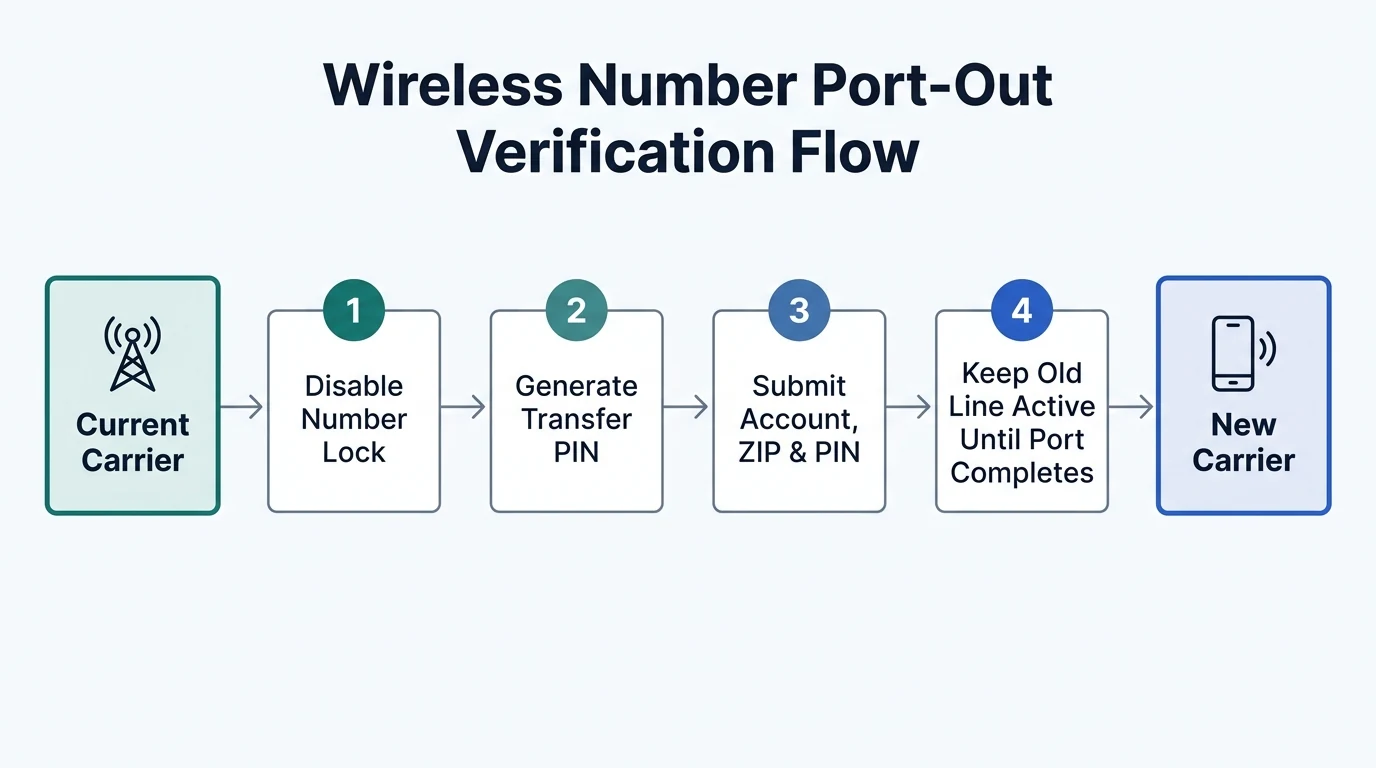
Porting timelines and federal processing windows
Federal porting interval rules establish firm maximum completion windows for wireline and intermodal ports, while mobile-to-mobile transfers typically finish faster when submitted details match cleanly.
| Transfer Category | Expected or Mandated Window | Cutoff or Operational Condition |
|---|---|---|
| Simple wireline or intermodal port (federal rule) | Within one business day | Mandatory business days are Monday through Friday, 8 a.m. to 5 p.m.; an accurate LSR received between 8 a.m. and 1 p.m. local time qualifies for same-day midnight activation |
| Non-simple wireline or intermodal port (federal rule) | Within four business days | Applies unless the customer or new provider requests a longer completion window |
| Wireless-to-wireless port (T-Mobile estimate) | 10 minutes to 3 hours | Depends on the accuracy of the submitted account number, billing ZIP code, and transfer PIN |
| Mobile or Google Voice port (Google Fi estimate) | Within 3 hours | Landline transfers typically finish within 2 business days; T-Mobile lists 3 to 10 days for landlines |
Avoiding premature cancellation, family-plan lockouts, and dual-service issues
Three operational mistakes cause the majority of stalled or failed ports even when the PIN itself is valid:
- Never cancel your old service first. AT&T, Verizon, T-Mobile, Xfinity Mobile, and Google Fi all require the transferring line to stay active until the new carrier completes the port. Disconnecting early on AT&T or Verizon forces you to reactivate the old line first, and Xfinity Mobile warns that canceling before completion stops the transfer and causes loss of the phone number.
- Move family-plan members before the account owner. Google Fi recommends transferring group plan members’ numbers first and porting the group plan owner’s number last, because closing the primary owner’s line early can disrupt access for remaining lines. Also remember that a pending transfer to one carrier blocks a new transfer request until the pending order is canceled.
- Plan for dual service, voicemail reset, and old eSIM cleanup. T-Mobile notes that service can remain active on both phones for up to 24 hours during a transfer—if you must call 911 during that window, stay on the line because emergency dispatch may not be able to call you back—and voicemail resets once the port finishes. On handsets using embedded SIMs, Google Fi advises deleting the previous carrier’s eSIM only after the new line works fully, because an old profile can cause service conflicts.
Before moving an existing handset onto a competing network, verify network compatibility and lock status in our unlocked versus carrier phone band support guide. If your new eSIM QR activation stalls during the switch, follow our Android eSIM transfer and EID recovery steps.
How do you request a number transfer PIN on AT&T Wireless?
On AT&T Wireless, a user with primary online access can generate a Number Transfer PIN through the online account profile, the AT&T app, or by dialing *PORT from a consumer AT&T mobile phone with the account passcode ready. Each consumer PIN expires 4 days after request, and Wireless Account Lock must be disabled before porting.
- Online AT&T account: Sign in to your account profile as a user with primary online access, select Settings, scroll to Transfer phone number, and choose Request new PIN so the code displays on screen.
- AT&T app: Sign in with primary online access, tap your profile icon, open Settings, choose Manage or remove account, open Settings again, scroll to Transfer phone number, and select Request new PIN.
- Phone call from an AT&T device: Call *PORT from your AT&T mobile line and follow the automated prompts using your account passcode to receive the Number Transfer PIN by text message.
AT&T expiry, account-lock, and business-line rules
One AT&T Number Transfer PIN applies to all numbers on the account that you intend to move. Consumer wireless PINs expire after 4 days, while AT&T Business Wireless PINs remain valid for 14 days.
Check three restrictions before requesting your code. First, if Wireless Account Lock is enabled, AT&T blocks outbound transfers until you turn the lock off. Second, suspended AT&T accounts can only request a Number Transfer PIN online or with the AT&T app rather than by text. Third, AT&T Business Wireless accounts require the primary user to generate the PIN online or contact AT&T so a representative can email it; business accounts cannot use the AT&T mobile device call or app methods.
How do you generate a Verizon number transfer PIN via app or #PORT?
On Verizon standard monthly accounts, the Account Owner or an Account Manager generates a Number Transfer PIN in the My Verizon app or website under Create Your Number Transfer PIN, or dials #PORT from the transferring phone to receive a secure text link that opens PIN generation inside the My Verizon app.
Verizon also allows generating a Number Transfer PIN through Customer Service or at an official Verizon retail store if you cannot access the app or website. If you do not have the handset holding the transferring number nearby, you can sign in to the My Verizon website from another smartphone, tablet, or computer to generate the code.
Verizon Number Lock, multi-line scope, and connected device rules
A Verizon Number Transfer PIN expires after 7 days and covers any or all lines on your account; simply tell your new carrier which exact lines to move. For business port-out requests involving 10 or more lines, Verizon requires calling 1-800-922-0204 instead of self-service checkout.
Before submitting the port to your new provider, verify that Verizon’s free Number Lock feature is turned off. You can disable Number Lock by dialing *611 or opening the Security page in My Verizon, switching Number Lock to Off for each transferring line, confirming the security authorization code Verizon sends, and saving changes. Note that Verizon states Number Lock blocks unauthorized port-outs but does not prevent SIM card or equipment changes.
Verizon charges no specific porting fee and sends a confirmation text whenever a port request hits your line. However, remaining device payment balances must be paid off, breaking an optional promotional monthly discount term requires repaying monthly discounts received up to a rolling maximum of 6 months, and moving your last phone line does not automatically close connected smartwatch, tablet, or hotspot lines—you must cancel those connected lines separately.
Where do you find your account number and temporary port-out PIN on T-Mobile?
Your T-Mobile account number appears inside your online T-Mobile account and on your monthly bill, while the Primary Account Holder must generate a Temporary Port Out PIN (TPOP) in the T-Life app or T-Mobile.com mobile browser while connected directly to the T-Mobile cellular network with Wi-Fi and private VPNs disabled.
Generating a T-Mobile postpaid Temporary Port Out PIN
T-Mobile restricts Temporary Port Out PIN generation to the Primary Account Holder and enforces a cellular-network verification check on postpaid personal accounts. Before requesting the code, turn off Wi-Fi and temporarily disable private VPN tools—including Apple iCloud Private Relay—so your request routes over the active T-Mobile SIM or eSIM.
- T-Life app (Postpaid): Sign in on your T-Mobile device over cellular data, open the Account tab, tap the top-right gear icon, choose Permission & controls, tap Transfer PIN, complete any verification prompt, and select Create PIN.
- T-Mobile.com mobile browser (Postpaid): Log in from a mobile browser on your T-Mobile handset rather than a desktop computer, select your name or person icon, open Profile, choose Permissions & controls, tap Transfer PIN, and select Create PIN.
- Phone fallback: If you run into verification errors or cannot access the cellular flow, call T-Mobile support at 1-800-937-8997 for transfer PIN assistance.
Disabling T-Mobile Port Out Protection per line
T-Mobile offers free Port Out Protection across T-Mobile Postpaid, T-Mobile for Business, T-Mobile Prepaid, and Metro by T-Mobile, and it must be managed individually for each line. Although an Authorized User can enable Port Out Protection on postpaid accounts, only the Primary Account Holder can turn it off in T-Life (Account > See Plans > Manage add-ons) or on T-Mobile.com (Account > Lines and Devices > Active Add-ons > Manage add-ons) before using the Temporary Port Out PIN. Keep your T-Mobile account number, Temporary Port Out PIN, and account PIN/Passcode ready when contacting your new carrier.
How do you get a port-out security PIN from Xfinity Mobile?
Xfinity Mobile refers to its port-out code as a security PIN, which a Primary or Manager Xfinity ID can generate online or in the Xfinity app after confirming a one-time passcode (OTP). The PIN works for any line on the account, expires after seven days, and requires Number Lock to be turned off on every line being transferred.
- Xfinity Mobile online: Sign in with a Primary or Manager Xfinity ID, open the Devices tab, select the device with the transferring number, scroll to Transfer your number, cancel this line, choose Learn More and Get Started, confirm the one-time passcode sent to the line, select the number from the drop-down menu, and choose Send My PIN.
- Xfinity app: Sign in with a Primary or Manager Xfinity ID, open the Services tab, select Mobile Lines and Data Usage under Mobile, pick the transferring number, tap Transfer or cancel this line and Get started, verify the one-time passcode, choose the number to receive the text, and tap Send My PIN.
Once your new provider activates your line, Xfinity automatically cancels service for that ported mobile line while leaving additional lines such as tablets or smartwatches active unless you port or cancel them separately. Never cancel your Xfinity Mobile line manually before the transfer finishes, because premature cancellation stops the port and causes loss of your number.
How do prepaid brands like Straight Talk and T-Mobile Prepaid handle transfer PINs?
Prepaid wireless brands also enforce carrier-issued Number Transfer PINs, port-out locks, and strict active-service checks before releasing a telephone number, with one extra timing hazard: letting a prepaid plan expire past its Service End Date can deactivate the account and forfeit your phone number before a transfer finishes.
On Straight Talk, the Terms and Conditions of Service state that porting out a telephone number requires the Number Transfer PIN provided by Straight Talk along with required account information. Once the number transfers out, Straight Talk deactivates service immediately and any unused Service Days remaining in the plan are lost. Equally critical, failing to redeem a plan before the Service End Date deactivates the Straight Talk account on that date and risks losing the phone number, with reactivation potentially assigning a new number.
On T-Mobile Prepaid, customers generate a Temporary Port Out PIN by logging in to T-Mobile.com, opening My T-Mobile in the upper-right corner, choosing My Profile, selecting Request Transfer PIN, and choosing Get a Transfer PIN. Both T-Mobile Prepaid and Metro by T-Mobile lines can also carry free Port Out Protection, which must be disabled before the Temporary Port Out PIN will clear an outbound port.
Major carrier number transfer PIN rules compared
| Carrier | Transfer Code Name | Primary Request Channels | Code Expiration | Lock Feature to Disable |
|---|---|---|---|---|
| AT&T Wireless | Number Transfer PIN | Account profile online, AT&T app, or dial *PORT (consumer mobile) | 4 days (consumer) or 14 days (business) | Wireless Account Lock |
| Verizon | Number Transfer PIN | My Verizon web/app, dial #PORT for app link, phone, or Verizon store | 7 days | Number Lock (*611 or My Verizon Security) |
| T-Mobile Postpaid | Temporary Port Out PIN (TPOP) | T-Life app or T-Mobile.com mobile browser on T-Mobile cellular (Wi-Fi and VPN off) | Temporary per request | Port Out Protection (per line) |
| T-Mobile Prepaid | Temporary Port Out PIN (TPOP) | T-Mobile.com > My T-Mobile > My Profile > Request Transfer PIN | Temporary per request | Port Out Protection (per line) |
| Xfinity Mobile | Security PIN | Xfinity online Devices tab or Xfinity app Services tab (OTP verified) | Seven days | Number Lock (per line) |
| Straight Talk | Number Transfer PIN | Straight Talk account channels and Customer Care | Active-plan window | Keep plan active prior to Service End Date |
Pre-port verification checklist and frequently asked questions
Verify four items with your current carrier right before handing your port order to the new provider:
- Account number: Copy the exact account number from your carrier portal or monthly bill rather than entering your phone number by mistake.
- Billing ZIP code: Confirm the billing ZIP code on record with your current carrier matches the address you submit on the new carrier’s port form.
- Port-out lock status: Confirm that Wireless Account Lock, Number Lock, or per-line Port Out Protection is turned off for every transferring line.
- Temporary transfer PIN and active line: Generate a fresh Number Transfer PIN within its validity window and keep the old line active until your new SIM or eSIM confirms full service.
What happens if I cancel my current carrier before the port finishes?
Canceling your current wireless line before the transfer finishes halts the port request. AT&T and Verizon require you to reactivate the disconnected number before your new carrier can retry the transfer, and Xfinity Mobile warns that canceling early stops the transfer and causes loss of your phone number.
Can I use my carrier account passcode instead of a number transfer PIN?
No on carriers that issue dedicated transfer codes. AT&T, Verizon, T-Mobile, Xfinity Mobile, and Straight Talk require a carrier-generated Number Transfer PIN, Temporary Port Out PIN, or security PIN to authorize an outbound port, even if you also use your permanent account passcode to authenticate the PIN request itself.
Does one number transfer PIN cover multiple lines on a family account?
On AT&T, Verizon, and Xfinity Mobile, a single generated transfer PIN applies to all numbers on the same account that you choose to transfer, provided each transferring line has its port lock disabled. On family plans, move member lines first and port the primary account holder’s line last.
Why does T-Mobile block my transfer PIN request on Wi-Fi or a VPN?
T-Mobile requires postpaid personal customers requesting a Temporary Port Out PIN in T-Life or a mobile browser to connect directly over the T-Mobile cellular network with Wi-Fi and private VPNs, including Apple iCloud Private Relay, temporarily turned off to validate device possession.
How long does a wireless number transfer take after submitting the PIN?
Wireless-to-wireless ports typically complete within 10 minutes to 3 hours on T-Mobile and within 3 hours on Google Fi when account details match accurately. Under federal porting interval rules, simple wireline and intermodal ports must finish within one business day, while landline transfers can take 2 business days to 10 days depending on the carrier.
Sources
- Electronic Code of Federal Regulations — Number Portability Rules (eCFR Subpart C)
- Electronic Code of Federal Regulations — CPNI and SIM Change Safeguards (eCFR Subpart U)
- Wikipedia — Local number portability
- AT&T Wireless Support — Get a PIN to Transfer Your Wireless Number
- Verizon Support — Move your mobile number to another carrier FAQs
- T-Mobile Support — Transfer your phone number
- Xfinity Mobile Support — How do I cancel my Xfinity Mobile service?
- Straight Talk — Terms and Conditions of Service
- Google Fi Wireless Help — Transfer your number to Google Fi
Related technical guides
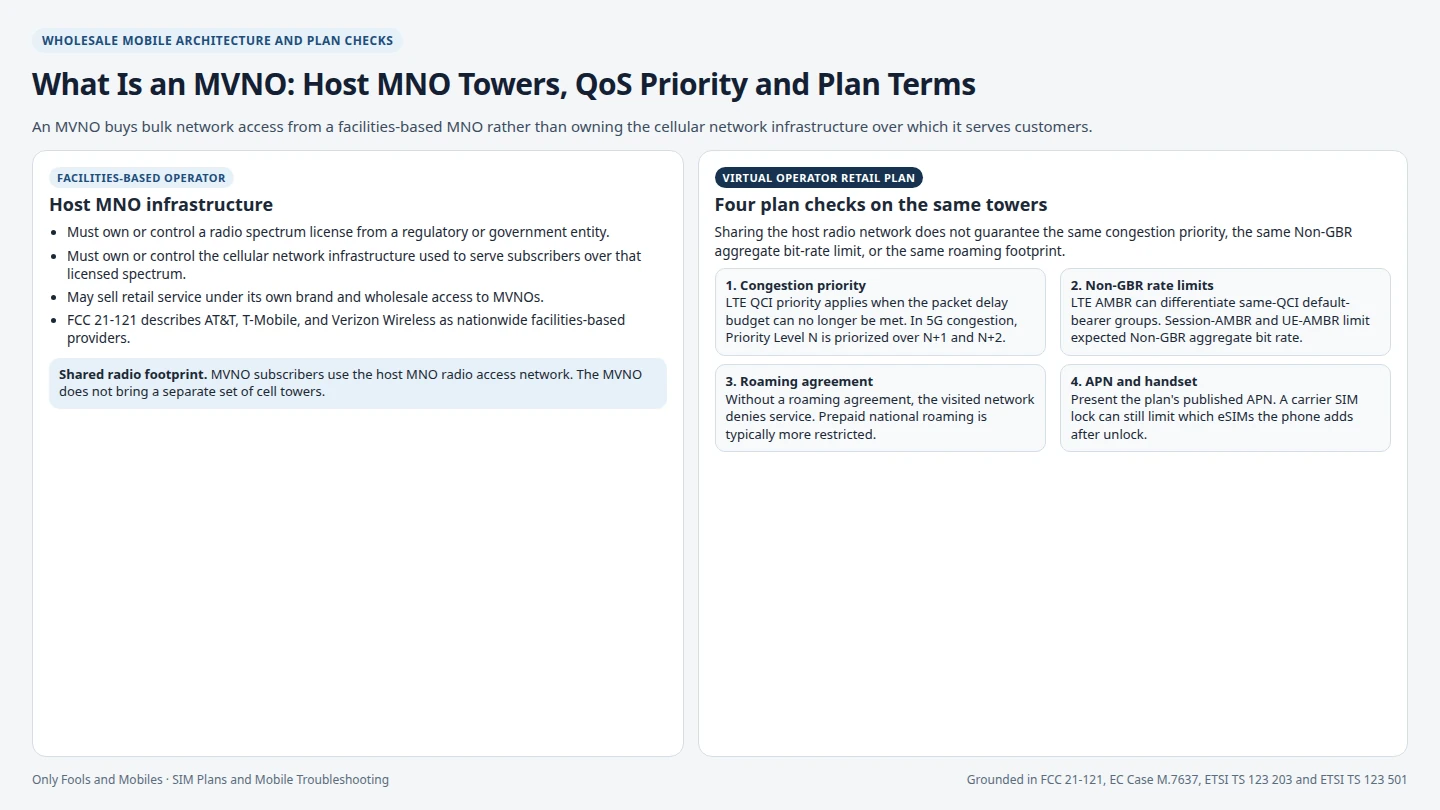
What Is an MVNO: Tower Priority and Plans
An MVNO buys wholesale access from a host MNO instead of owning towers. Plans on the same host can differ in priority, rate caps, APN, and roaming.
Read technical guide
Dual SIM DSDS vs DSDA Radio Modes
Compare DSDS versus DSDA Android dual SIM standby versus dual active radio behavior, second SIM call and data rules, eSIM MEP, and model checks.
Read technical guide
Android eSIM Transfer When the QR Code Is Already Consumed
Fix an Android eSIM transfer when a scanned QR code fails as already used or bound. Check existing profiles, run device-to-device transfer, or use your EID.
Read technical guide