Android eSIM Transfer When the QR Code Is Already Consumed
Fix an Android eSIM transfer when a scanned QR code fails as already used or bound. Check existing profiles, run device-to-device transfer, or use your EID.
A SubjectCode of 8.1.1 and a ReasonCode of 3.8 means the EID is bound to another device, and ERROR_NO_PROFILES_AVAILABLE means no profiles are available from SM-DP+.
When a phone shows No SIM or activation pending, users should check whether the line is installed and enabled, follow the carrier’s activation instructions on a reliable connection without deleting the profile casually, and note that an EID identifies the eSIM hardware while an ICCID identifies a SIM or profile.
If a phone breaks, carrier reissue may be needed for an eSIM if device-to-device transfer is unavailable; users should not delete the old profile before the replacement line works and should ask the carrier about reinstallation if a QR code fails.
Start by verifying whether the line is already present on your handset or blocked by a carrier lock before requesting a fresh activation profile. Keep this recovery sequence alongside our SIM plans and mobile troubleshooting hub when diagnosing a line that fails to connect after a handset swap.
Why a scanned eSIM QR code fails as already consumed or bound
eSIM is a global specification driven by the GSMA that enables remote SIM provisioning (RSP) of any mobile device, and starting with Android 9, the Android framework provides standard APIs for accessing eSIM and managing subscription profiles on the eSIM.
The GSMA maintains three versions of the eSIM standard: SGP.22 for consumer devices, SGP.02 for machine-to-machine (M2M) devices, and SGP.32 for IoT published in May 2023.
The eUICC chip used to host the eSIM is installed via surface-mount technology at the factory and uses the same electrical interface as a physical SIM as defined in ISO/IEC 7816 with a small format of 6 mm × 5 mm.
All eUICCs are programmed with a permanent eUICC ID (EID) at the factory, which is used by the provisioning service to associate the device with an existing carrier subscription and negotiate a secure channel for programming.
The LPA is a standalone system app that manages profiles on the eSIM and serves as a bridge between the SM-DP+ (remote service that prepares, stores, and delivers profile packages to devices) and the eUICC chip.
An activation code can be parsed from a user scanned QR code in the format defined in SGP.22, for example “1$SMDP.GSMA.COM$04386-AGYFT-A74Y8-3F815$1.3.6.1.4.1.31746”.
EuiccCardManager provides ES10x functions based on GSMA RSP v2.0 to issue commands to the eUICC chip, such as prepareDownload(), loadBoundProfilePackage(), retrieveNotificationList(), and resetMemory().
Devices running Android 10 or higher can support devices with multiple eSIMs.
Support for IRadioConfig HAL v1.2 is required for devices launching with Android 10, and in v1.2 SimSlotStatus includes the Embedded Identity Document (EID).
Review our comparison of eSIM versus physical SIM card switching and theft security if you are deciding whether to keep a removable card slot or move your primary line onto an embedded profile.
Android LPA error codes and first containment checks
When a QR scan or profile download fails on Android, the Local Profile Assistant receives structured operation and reason codes from the provisioning server or the local chip.
Starting from Android 11, EXTRA_EMBEDDED_SUBSCRIPTION_OPERATION_CODE is included in the resulting callback intent to provide information about what went wrong, such as downloading or deleting an eSIM profile.
EXTRA_EMBEDDED_SUBSCRIPTION_SMDX_SUBJECT_CODE and EXTRA_EMBEDDED_SUBSCRIPTION_SMDX_REASON_CODE together provide the SubjectCode[5.2.6.1] and ReasonCode[5.2.6.2] from GSMA (SGP.22 v2.2) when the operation code is OPERATION_SMDX_SUBJECT_REASON_CODE.
In GSMA (SGP.22 v2.2) error reporting on Android, a SubjectCode of 8.1.1 and a ReasonCode of 3.8 means the EID is bound to another device.
Under OPERATION_SMDX, ERROR_ADDRESS_MISSING means no SM-DP+ address to download the profile, ERROR_INVALID_CONFIRMATION_CODE means an error occurred while parsing the activation code (invalid format), and ERROR_NO_PROFILES_AVAILABLE means no profiles are available from SM-DP+.
Local installation conflicts and carrier lock restrictions
Not every download failure stems from an exhausted QR code on the server; local profile conflicts and carrier subsidy locks also block installation.
Under OPERATION_EUICC_GSMA, ERROR_INSTALL_PROFILE indicates an error with the eUICC while trying to install a profile (for example, the profile already exists or the ICCID doesn’t match), ERROR_EUICC_INSUFFICIENT_MEMORY indicates not enough memory on the eUICC, and ERROR_DISALLOWED_BY_PPR indicates installation is not allowed by the profile policy rule.
Under OPERATION_DOWNLOAD, ERROR_INVALID_ACTIVATION_CODE indicates an error while parsing the activation code (invalid format) or trying to download with no activation code, ERROR_CARRIER_LOCKED means download is not allowed because the device is carrier locked (SIM locked), and ERROR_INCOMPATIBLE_CARRIER means the carrier is in the blacklist.
If the eSIM is SIM locked (subsidy locked), the modem sets the card state as CardState:RESTRICTED in the getIccCardStatusResponse method.
On a Pixel phone running Android 11 or higher, temporarily turning off a SIM uses Settings > Network & internet > Mobile network > Use this SIM, whereas deleting an eSIM uses Erase eSIM, and requiring a password to delete an eSIM uses Settings > Security > Advanced > Confirm SIM deletion.
Always check whether your profile is already installed and simply toggled off before selecting the erase action. Before requesting a replacement activation profile from a different network, follow our guide on unlocked versus carrier phone band support and lock rules to confirm the handset is free of network restrictions.
Native Android device-to-device eSIM transfer
When you still have the working source phone in hand and your carrier supports automated entitlement transfer, use Android’s built-in proximity migration instead of rescanning the original QR voucher.
eSIM Transfer clients allow for the transfer of eSIM profiles and physical SIM data from one device to another, or converting physical SIMs to eSIM on the same device, and are compatible on source devices running Android 10 and higher and target devices running Android 14 or higher.
In Settings on the target Android device, the user selects the SIMs menu and selects the Transfer a SIM from another device button to display a QR Code for D2D pairing, and the device prompts the user to confirm the transfer on the source device.
The communication channel between the source device and the target device is end-to-end encrypted with a rotating key and an incrementing frame number to prevent replay and man-in-the-middle attacks, and the source device must be protected with a screen lock (such as a PIN lock) whose verification authorizes the transfer.
Entitlement token exchange and eligibility checks
Behind the pairing screen, the source and target handsets coordinate with the carrier’s entitlement server so the old line is not cut off prematurely.
During GSMA TS.43 eSIM Transfer, the eSIM Transfer client on the source device performs EAP-AKA, CheckEligibility, and AcquireTransferToken procedures, and the entitlement server returns a temporary token and an expTime value indicating the lifetime of the token.
On the target Android device during eSIM Transfer, the entitlement server returns the activation code, which the eSIM Transfer client passes to the LPA, and a secure channel is established between the SM-DP+ and the LPA through the ES9+ interface to download the profile based on the activation code.
The entitlement server (ES) should separate subscription transfer (ManageSubscription(3:TRANSFER)) and subscription activation (ManageSubscription(5: ACTIVATE TERMINAL ICCID)) so carriers do not deactivate the pSIM or eSIM in the source device if there is a profile download failure in the target device.
For TS.43 subscription transfer, the carrier backend system should process a SIM swap request (ManageSubscription(3:TRANSFER SUBSCRIPTION)) in under 5 seconds for the majority of all transactions, and if it requires more than a few seconds, the carrier and ES must support delayed download by polling defined in TS.43 section 7.3.2.
Carrier CheckEligibility operations (GSMA Service Entitlement Configuration section 6.5.2) must support failure due to account issues (suspended account, unpaid dues, or eSIM Transfer restrictions), device liability (enterprise, prepaid, or MVNO), and device block list (fraud alert or stolen).
When inspecting a pre-owned handset before transferring service, run through our refurbished phone IMEI blacklist and finance lock check so an unpaid balance or stolen-device flag does not block activation.
Carrier app activation and EID pre-binding
The carrier can pre-bind a profile to your new phone’s EID (getActivationCodeForEid) before download.
EuiccManager.getEid() gets the EID identifying the eUICC hardware (which may be null if the eUICC is not ready), and the caller must have carrier privilege or the READ_PRIVILEGED_PHONE_STATE permission.
The difference between getActivationCode and getActivationCodeForEid is that getActivationCodeForEid allows a carrier to pre-bind a profile to the device’s EID before the download process begins.
On devices running Android 11 and higher, the LPA can start a carrier app’s UI when a carrier app requires additional information from the user before supplying an activation code to the LPA, such as logging in to activate phone numbers or perform porting services.
If the carrier app determines that the user should scan a QR code instead of letting the LPA bind the carrier app’s service, it sets the boolean extra android.telephony.euicc.extra.USE_QR_SCANNER to true so the LPA launches the QR scanner.
Google Fi Wireless transfer rules on Android
Some carriers enforce an app-only activation workflow on Android and explicitly reject both proximity transfer and QR scanning.
Bringing your own device to Google Fi requires the device to be unlocked by the previous carrier, and Google Fi eSIM activation requires Android 11 and above.
When upgrading from a device with SIMs for both Google Fi and another carrier, users should skip the Android eSIM transfer screen since Google Fi doesn’t support this feature, sign in to the Google Fi app, and not scan a QR code at activation because it is for iPhone users only.
Finding the EID, EID QR code, and second IMEI for manual reissue
When the previous phone is broken, lost, or incompatible with self-service transfer, carrier support will ask for your target phone’s EID and IMEI numbers to issue a replacement profile.
Users should pull the 15-digit IMEI and the 32-digit EID on eSIM-capable phones directly from the handset’s live software or by opening the Phone app keypad and dialing *#06#.
To use a mobile network, a Pixel phone needs an IMEI (International Mobile Equipment Identity) number, and to use an eSIM, a phone also needs an EID (Embedded Identity Document) number; Pixel phones that can use both eSIM and SIM cards have 2 IMEI numbers (IMEI 1 and IMEI 2).
To issue an eSIM for Dual SIM Dual Standby (DSDS), a carrier may ask for a Pixel phone’s IMEI 2, which is found by turning on DSDS and opening the Settings app > About phone > “IMEI (SIM slot 2).”
On a Google Pixel phone, the EID number can be found on the phone’s box or in the phone’s Settings app by tapping About phone > SIM status > “EID.”
To find a Pixel phone’s EID QR code, open the Settings app, tap Network & internet, tap Add next to “Mobile network”, tap Download a SIM instead?, and tap Next > Activating in a store?.

Pixel eSIM model boundaries and multiple enabled profiles
Before asking a carrier to bind a profile to a used or imported Pixel handset, verify that the specific generation and regional variant support embedded profiles and dual active lines.
On Google Pixel phones, Pixel 4 and later all work with eSIM; Pixel 3a phones bought with Verizon service or in Japan don’t work with eSIM; Pixel 2 phones only work with eSIM when bought with Google Fi service; and Pixel (2016) phones do not work with eSIM.
In the US, if you have a Pixel 10 or later (except the Pixel 10 Pro Fold), you can only use an eSIM, and you can use 2 eSIM profiles at once if you have a Pixel 7, Pixel 7 Pro, or later phone and your carrier allows this feature.
For devices running Android 13 or higher, Android supports multiple enabled profiles (MEPs) for eUICC, and devices running Android 14 or higher support the MEP-A1 and MEP-B options specified in GSMA SGP V22 3.0.
To help ensure users don’t lose service when moving eSIM profiles from one port to another, AOSP recommends that carriers provide support for fluid mapping of IMEI and SIM and multiple ICCIDs or SIMs for each eUICC identifier (EID).
Your eSIM recovery handoff and frequently asked questions
Before contacting your mobile operator to replace a consumed QR code or rebind a stuck line, gather these exact details from the target Android handset:
- Exact handset model name and installed Android version.
- Whether an existing profile is already listed under mobile network settings and toggled off.
- The full hardware EID string from the SIM status menu or retail box label.
- Both IMEI slots displayed in the device status screen when dual standby is active.
- The exact wording of any activation error banner shown on screen.
Share those identifiers with your carrier’s technical support team and ask them about reinstallation if a QR code fails.
Why does my eSIM QR code say it is already in use or no profiles are available?
A SubjectCode of 8.1.1 and a ReasonCode of 3.8 means the EID is bound to another device, and ERROR_NO_PROFILES_AVAILABLE means no profiles are available from SM-DP+. Check whether the profile is already installed on your phone, or request a fresh activation profile from your carrier.
Should I erase my working eSIM if activation stalls during a phone upgrade?
Never erase a working profile on your old handset or delete a pending profile casually before the replacement line is active.
When should I give my carrier the second IMEI number on a Pixel phone?
To give you an eSIM for Dual SIM Dual Standby (DSDS), a carrier may ask for a Pixel phone’s IMEI 2.
Sources
-
Android Open Source Project — Implementing eSIM
-
Android Open Source Project — eSIM Transfer Carrier Integration
-
Android Open Source Project — Handling eSIM Errors
-
Android Open Source Project — Implementing eUICC APIs
-
Android Open Source Project — Modem Requirements for eSIM
-
Android Open Source Project — Multiple Enabled Profiles
-
Android Developers Reference — DownloadableSubscription
-
Wikipedia — eSIM
-
Google Pixel Help — How to use dual SIMs on your Google Pixel phone
-
Google Pixel Help — Find your Pixel phone’s IMEI or EID number
-
Google Pixel Help — Get a SIM and add it to your Pixel phone
-
Google Fi Wireless Help — Transfer your Google Fi service to a new phone
Related technical guides
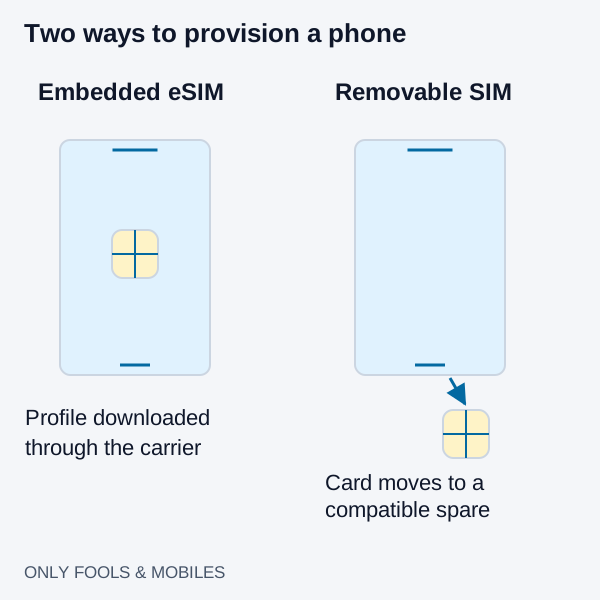
eSIM vs. Physical SIM Card: Carrier Switching, Roaming, and Theft Security
Compare eSIM and physical SIM for travel, broken-phone recovery and theft protection, with carrier-specific activation and roaming checks.
Read technical guide
How to Stop Apps Running in Background on Android (Battery Save Guide)
Find Android background battery drain, use Pixel or Galaxy controls, preserve messaging alerts and distinguish battery restrictions from background data.
Read technical guide
Refurbished Phone IMEI Blacklist and Finance-Lock Check Before You Buy
Run a separate refurbished phone IMEI blacklist check and carrier finance-lock inspection before the return window closes—cosmetic grades and battery health do not clear network debt.
Read technical guide