Battery Health Percent Versus Cycle Count on a Renewed Phone
Check a refurbished phone battery health percentage alongside cycle count, model details and repair messages. Use this buyer’s checklist before deciding.
Check a refurbished phone battery health percentage alongside its cycle count, exact model and battery messages before making your buying decision.
On an iPhone, maximum battery capacity measures capacity relative to when the battery was new.
On an iPhone, a charge cycle is completed when you have used an amount representing 100 percent of the battery’s capacity.
Start by collecting the readings the handset provides. Then compare them with the guidance for that model and the seller’s written battery promise. Use this page alongside our refurbished phone buying guides.
Battery cycle count versus health percent: what to record
Keep separate entries for maximum capacity, cycle count and any battery warning. Copy each label as well as its value.
On iPhone, algorithms and measurements taken during use determine maximum battery capacity.
An iPhone battery’s chemical age results from several factors, including temperature history and charging pattern.
The iPhone Battery Health screen includes maximum battery capacity and peak performance capability.
Read the performance message as well as the capacity figure. When comparing listings, ask for current screenshots from the handset you intend to buy.

How partial use adds to cycle count
For a Google Pixel, the charge cycle count includes partial discharges.
For example, using a Pixel from 100% charge to 50% charge and then recharging it to 100% is calculated as 0.5 cycles.
For Apple lithium-ion batteries, it could take several days to complete a cycle.
When making your comparison, use the reported cycle count rather than tallying cable connections.
Where to check the battery readings
Start with the exact model and software version. Follow the matching route, and keep the whole screen in your screenshot.
iPhone
On iPhone 15 models and later with iOS 17.4 and later, you can see battery health and maximum capacity.
For those models and software versions, open Settings, tap Battery, then tap Battery Health.
On iPhone 15 or later, you can also see cycle count, manufacture date and first use date.
Copy the available dates into your inspection notes together with the battery readings.
Google Pixel
On Pixel 8a and later, check cycle count in Settings, About phone, Battery information.
For those phones, check estimated capacity under Battery, Battery health, Battery capacity.
Pixel 6a, Pixel 7, Pixel 7 Pro, Pixel 7a, Pixel 8, and Pixel 8 Pro do not indicate battery health status.
For Pixel battery health, initial values are based on lab results and may differ from the actual battery state.
If a field is absent, record “not displayed” and ask the seller which diagnostic record supports the listing’s battery claim.
Samsung Galaxy
Samsung Members Phone diagnostics can check the current battery condition of a Galaxy device.
Menu names, settings and screen layouts may vary depending on the model and software version.
Keep the diagnostic result in its original wording. Ask the seller to explain how it relates to the battery condition promised in the listing.
Compare the readings with the correct model guidance
Match the phone to the named model group before using a battery benchmark. Keep Apple’s design targets and Google’s replacement recommendations under their own headings.
Apple design targets
Batteries of iPhone 14 models and earlier are designed to retain 80 percent of their original capacity at 500 complete charge cycles under ideal conditions.
Batteries of iPhone 15 models and later are designed to retain 80 percent of their original capacity at 1000 complete charge cycles under ideal conditions.
With all iPhone models, the exact capacity percentage depends on how the devices are regularly used and charged.
Google replacement recommendations
For Pixel 3 through Pixel 8 Pro and Pixel Fold, Google recommends battery replacement when remaining capacity is less than 80% or the battery reaches 800 cycles.
For Pixel 8a and later, Google recommends battery replacement when remaining capacity is less than 80% or the battery reaches 1000 cycles.
Apply the capacity condition and the cycle condition separately. If either replacement condition applies to your Pixel, ask the seller to address battery replacement before you decide to keep it.
For the listing’s grading and warranty terms, continue with our Amazon Renewed versus refurbished buying guide. Compare the actual reading with the written promise attached to your order.
What to check when the readings raise questions
Open the repair history and read any warning in full. Ask about the battery’s replacement history before reaching a conclusion from the percentage.
Battery verification and repair messages
If an iPhone shows “Unable to verify this iPhone has a genuine Apple battery,” the battery-health information might not be accurate.
With iPhone XR, iPhone XS models, and later, you can see Parts and Service History and whether the battery has been replaced.
On supported iPhones with iOS 15.2 and later, open Settings, tap General, then About for Parts and Service History.
If the repair used genuine Apple parts and processes, Genuine appears next to Battery.
With iPhone 15 and later using iOS 18, Used appears if the battery was already used or installed in another iPhone.
In Parts and Service History, Unknown can appear in situations such as a nongenuine replacement or a part that is not working as expected.
If a part has been serviced more than once, only the most recent service appears.
Save the exact message and request the relevant repair record. Compare the seller’s answer with the handset’s display and your order description.

Your battery-check handoff
Before deciding whether to keep the phone, assemble the following:
- Exact phone model and installed software version.
- Screenshot of the health or maximum-capacity reading, with its label visible.
- Cycle count where displayed, plus available battery dates.
- Full wording of any battery, performance or repair-history message.
- The seller’s written battery promise and any replacement documentation.
If the displayed capacity falls below the seller’s written promise, send the screenshot with the relevant order wording and request a remedy. If a metric is absent, ask for the diagnostic evidence behind the seller’s claim. If a warning appears, ask the seller to address that exact warning.
Use this request: “Please provide the phone model, software version, current system battery health percentage, cycle count where available, and any battery or repair-history messages. Please also confirm the battery condition promised for this handset and provide any replacement record.”
Return to our refurbished phone buying guides for the rest of your purchase checks.
Sources
-
Apple — iPhone battery and performance
-
Apple — About recalibration of battery health reporting
-
Apple — About Charge Limit and Optimized Battery Charging on iPhone
-
Google — Understand your Pixel battery
-
Apple — Why Lithium-ion?
-
Apple — About iPhone battery and performance
-
Apple — Understand your iPhone battery usage and health
-
Samsung — How to check the battery condition on your Samsung Galaxy
-
Apple — About genuine iPhone batteries
-
Apple — iPhone Parts and Service History
Related technical guides

Refurbished Phone IMEI Blacklist and Finance-Lock Check Before You Buy
Run a separate refurbished phone IMEI blacklist check and carrier finance-lock inspection before the return window closes—cosmetic grades and battery health do not clear network debt.
Read technical guide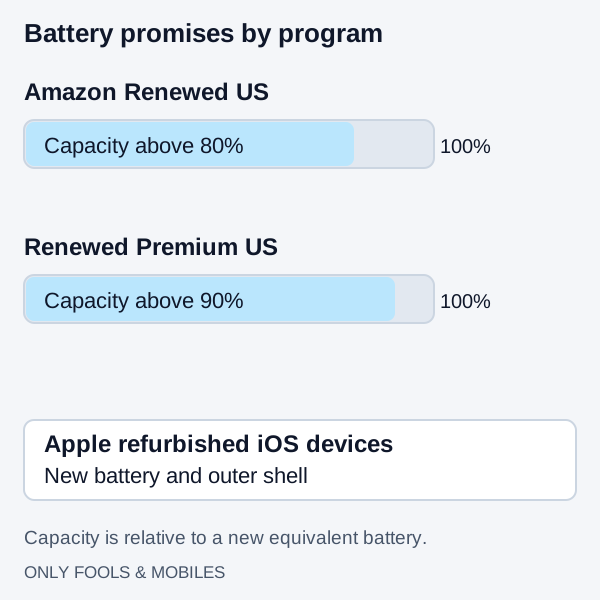
Amazon Renewed vs. Refurbished: Grading, Battery Health, and Warranty Compared
Compare Apple refurbished iOS devices with Amazon Renewed US battery, parts and cosmetic rules, then use a first-30-minute delivery checklist.
Read technical guide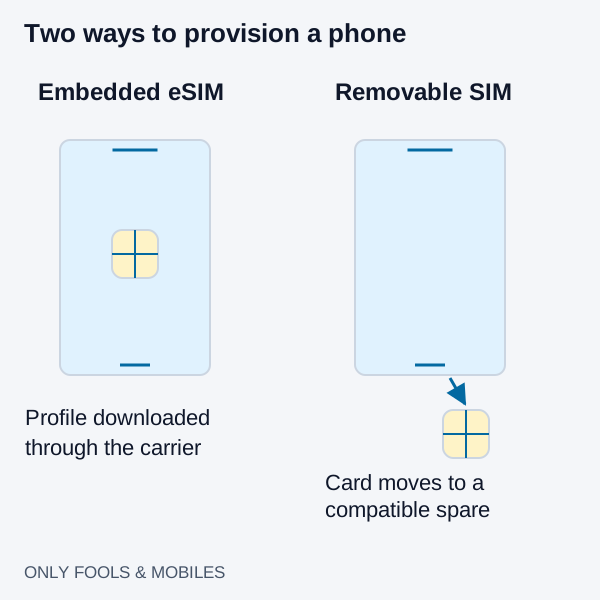
eSIM vs. Physical SIM Card: Carrier Switching, Roaming, and Theft Security
Compare eSIM and physical SIM for travel, broken-phone recovery and theft protection, with carrier-specific activation and roaming checks.
Read technical guide